Find everyone you blocked on social media, email and text messages

Sadly, people aren’t always as nice as they could be, and that’s where you need to turn to the various blocking and reporting features on the digital platforms you frequent. Overall, these features work well and effectively put up barriers between you and those you don’t want to hear from.

But what happens when you want to unblock someone? Maybe you’ve had a change of heart—perhaps enough water has gone under enough bridges to make you ready to think again. Or maybe you think you might have accidentally blocked someone you didn’t mean to. Whatever the reason, it’s worth reviewing your block lists once in a while.

This is quite a significant undertaking, considering all the different accounts you’re probably signed up to, but it only takes a few minutes each time—and you don’t need to do it all that frequently.

Social apps
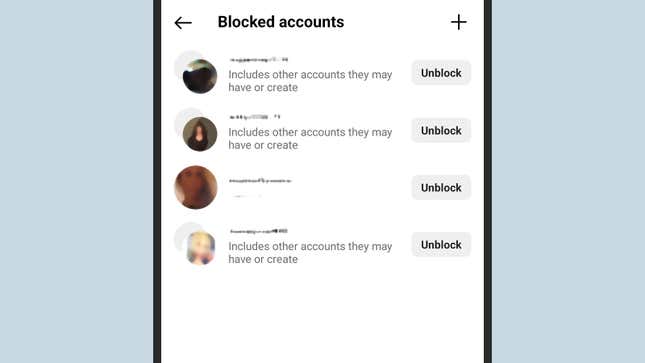
Blocked contacts on Instagram.

Blocked contacts on Instagram.
Screenshot: Instagram

On the Facebook website and inside the Facebook mobile app, you can click your profile picture (top right), then Settings & privacy, Settings, and Blocking. You can view and edit lists of people you’ve blocked outright or just asked to see less of in the news feed.

Instagram

When it comes to Instagram, in the app, tap your profile picture (bottom right), then the three horizontal lines (top right), then Blocked. If you’re using Instagram on the web, click More (bottom left), then Settings and Blocked.

Twitter/X

On the social network formerly known as Twitter (now called X), if you load up the website, you can click the three dots on the left, then Settings and Privacy, Privacy and Safety, Mute and Block, and Blocked Accounts. In the mobile app, tap your profile picture (top left), then Settings & Support to get to Settings and Privacy.

Snapchat

Head into the mobile app, and tap your profile picture (top left): Then it’s the gear icon (top right), then Blocked users. While there is an official Snapchat interface on the web you can access with your account, it does have its limitations—and you can’t access your blocked Snapchat contacts from a web browser.

Tiktok

In the mobile app, tap Profile, then the three horizontal lines (top right), then Settings and Privacy, Privacy, and Blocked accounts. As with Snapchat, while you can get at your TikTok account on the web and access a limited number of settings, you can’t see a list of people you’ve blocked in a browser.

Messaging apps
Finding blocked contacts on WhatsApp.

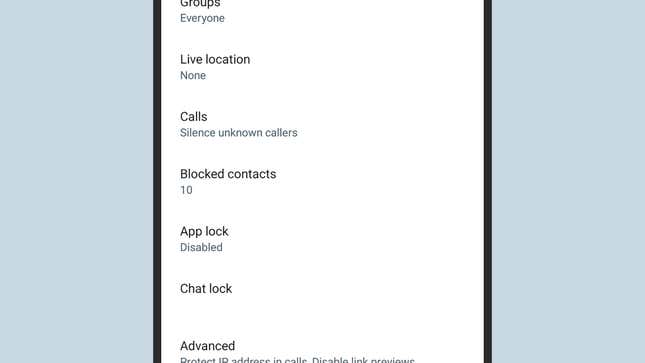
Finding blocked contacts on WhatsApp.
Screenshot: WhatsApp

iPhone and iPad

If you’re on an iPhone or iPad, it’s the same block list for the Phone app, Messages, and FaceTime. Open up Settings in iOS, then choose Phone and Blocked Contacts, Messages and Blocked Contacts, or FaceTime and Blocked Contacts. It’s the same list in each case, and you can add new people to it as well as take people off it.

Android Phones

On Android, the situation varies slightly depending on your phone, but on Pixel devices, the blocked list is synced between the Phone and Messages apps. You can tap the three dots (top right) from the Phone app, then Settings and Blocked numbers. From Messages, you can tap your profile picture (top right), then Spam and Blocked to see messages you’ve blocked; tap the three dots (top right) and Blocked numbers to view those as well.

WhatsApp

When it comes to WhatsApp, even after all these years, the mobile app interface is still different depending on which type of phone you have: If you’re on Android, tap the three dots (top right of the Chats tab), then choose Settings, Privacy, and Blocked contacts. On iOS, it’s Settings, then Privacy, and Blocked.

Signal

As for Signal, you can get to your list of blocked contacts by tapping on the three dots in the top right corner of the Chats tab, then picking Settings, Privacy, and Blocked. The next screen lets you add another contact to your blocked list, or unblock a contact that you’ve previously put there.

Telegram

The last messaging app we’ll cover is Telegram, which, like WhatsApp, has a different interface on different platforms. On Android, tap the three horizontal lines (top left), then Settings, Privacy and Security, and Blocked Users. On iOS, you switch to the Settings tab, then pick Privacy and Security and Blocked Users.

Email apps
You may have blocked contacts in your email app, too.

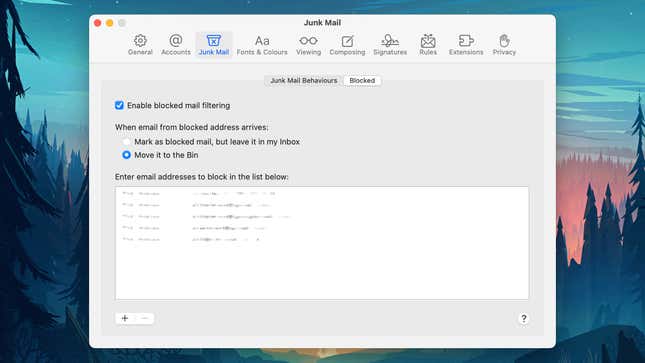
You may have blocked contacts in your email app, too.
Screenshot: Apple Mail

Your email clients are the final group of apps you want to check for blocked contacts. In Gmail on the web, click the gear icon (top right), then See all settings and Filters and blocked addresses. Scroll down to see email addresses that have been blocked and unblock them if needed.

Gmail

Strangely enough, you can’t get to these email addresses through the Gmail app on mobile—you can only get to the contacts blocked through your Google account, which covers services such as Google Chat, Google Photos, and Google Maps. These blocked users are separate from Gmail, and you can also find a list in your Google account on the web.

Apple Mail

If Apple Mail is your email service of choice, in the macOS client you can open the Mail menu and choose Settings, then switch to the Junk Mail tab and click Blocked to see email addresses you aren’t receiving messages from. On iOS, this list is actually shared with the Phone, Messages, and FaceTime apps—you can see it if you tap Mail and then Blocked from iOS Settings. The list isn’t available via iCloud on the web.

Outlook

In the default Outlook app for Windows, you need to click on the gear icon (top right), then choose Email and Junk email to find your blocked senders and domains. The layout is exactly the same if you open Outlook on the web to get to the same feature, but the list of blocked email addresses isn’t available through the Outlook mobile app.

Suppose you’re using a different email application. In that case, whether through a desktop client or a web interface, it shouldn’t be too difficult to find the options for blocked senders or junk emails—if there’s a regular correspondent who you haven’t heard from for quite some time, this might be why.


A version of this article originally appeared on Gizmodo.

Source link

Visited 1 times, 1 visit(s) today

Related Article

Modular EV Architecture Platforms Market Roadmap: Expected

Modular EV Architecture Platforms Market The Global Modular EV Architecture Platforms Market Study, a comprehensive analysis of the market that spans more than 143+ pages and describes the product and industry scope as well as the market prognosis and status for 2025-2032. The marketization process is being accelerated by the market study’s segmentation by important

12 Best Apps to Draw Tattoo Designs in 2026

In today’s digital age, tattoo apps have become indispensable tools for both aspiring and professional tattoo artists. They give tattoo artists the ability to create designs digitally, saving them time and allowing them to present professional designs to their clients. So, what app do tattoo artists use? which one is the best? Having the right

Cadillac hits 100,000 EV sales as Tesla drivers jump ship

Cadillac has hit a major milestone in the luxury EV race, reaching 100,000 electric vehicle sales just a few years after launching its first all-electric model. As Motor1 noted, GM said in January 2019 that Cadillac would spearhead its EV effort. That strategy began to take shape with the 2023 Lyriq, which was Cadillac’s first

Dangerous Deepfakes and AI Therapy: What Parents Need to Know

On this episode of Generation AI, host Derek Staahl digs into two AI trends that are hitting close to home for families right now. First: “nudify” apps and dangerous deepfakes. These tools can take an ordinary photo and turn it into an explicit AI-generated image—and a new investigation shows students around the world are being

Samsung Galaxy A37 Review: a Reliable Android Phone With a Few Frustrating Flaws

The most popular phones in Samsung’s smartphone portfolio aren’t the uncannily thin Folds or the pen-touting Ultras; they are the Galaxy A-series phones that make up the bulk of Samsung’s sales and rank among the best-selling phones in the world quarter after quarter. I expect the Samsung Galaxy A37 to replace its A36 predecessor in

Trump Mobile ships US-assembled T1 phones after months-long delay

May 13, 2026, 4:28 p.m. ET Trump Mobile said on Wednesday it has begun shipping its long-delayed $499 T1 smartphones to customers, several months after the gold-colored device was originally slated for release in August. The mobile venture, launched in June last year by the Trump Organization under a trademark licensing arrangement, had pushed back

OpenAI Endorses The Kids Online Safety Act

Stock all/Shutterstock OpenAI, which is currently facing a raft of lawsuits over alleged safety lapses in ChatGPT, has endorsed the Kids Online Safety Act (KOSA). The company said that its endorsement was part of a broader commitment to create “AI-specific rules” for kids safety. OpenAI’s endorsement comes

Trump Phone Will Finally Ship This Week, Report Says

The golden Trump phone is finally shipping out this week to people who preordered it, according to an emailed statement given by Trump Mobile CEO Pat O’Brien to USA Today. Trump Mobile expects phones will be delivered within the next few weeks after months-long production delays, the report said. “Those delays were worth it in

Unisys Selected as Technology Services Provider for the UK Government’s Crown Commercial Service Technology Services 4 Framework — TradingView News

The company will provide secure, modern technology services to support UK public sector organisations LONDON and BLUE BELL, Pa., May 13, 2026 /PRNewswire/ — Unisys (UIS) has been selected as a technology services provider across all 6 lots within the UK Government Crown Commercial Service (CCS) Technology Services (TS4) framework. The framework enables public sector organisations

5 New Samsung Galaxy Devices Set for July Unpacked Launch

Summary created by Smart Answers AI In summary: Tech Advisor reports Samsung’s July 22nd Unpacked event in London will unveil at least five new Galaxy devices, including the Z Fold 8 and Flip 8 foldables. These foldables are expected to be the first devices shipping with Google’s Gemini Intelligence, potentially beating Google’s own Pixel devices

School Board directs PUSD to tighten mobile device policy on high school campuses

The Board of Education on Wednesday night directed the school district to tighten its mobile device policy on Piedmont’s high school campuses. What was a “phones away except at lunch” policy for 2025-2026 is set to move to a bell-to-bell policy while on campus starting next year. Students in TK – eighth grade already operate

Sony Xperia 1 VIII: Release Date, Price & Specs

Summary created by Smart Answers AI In summary: Tech Advisor reports that Sony’s Xperia 1 VIII features a major design overhaul with a square camera module, new ORE texture, and Snapdragon 8 Elite Gen 5 chip starting at £1,399. The flagship introduces enhanced camera technology including a 48Mp telephoto sensor, AI assistant, and multi-frame RAW

Trump Mobile says T1 phones will ship this week

May 12, 2026, 6:09 p.m. ET Trump Mobile phones are being shipped this week, the company exclusively confirmed to USA TODAY in an email May 11. The Trump Organization launched Trump Mobile, a new cellular service and smartphone company, on June 16. The company’s first smartphone — the T1 Phone — was originally scheduled for

Samsung’s One UI 9 Beta Will Roll Out For Galaxy S26 Owners This Week

Mat Smith / Engadget Beginning this week, Galaxy 26 owners can test drive One UI 9, built on Android 17. New features include a Quick Panel redesign and new creative options for Samsung Notes. Try to contain your excitement. Accessibility features may be the highlight. One UI 9 beta

Tesla Officially Enters India Market with Premium EV Push, Launches 6-Seater Model YL

Mumbai: After years of speculation and policy discussions, Tesla has officially entered the Indian automobile market, marking a significant moment for the country’s electric vehicle (EV) ecosystem. However, instead of launching a budget-friendly EV for the masses, the American automaker has chosen a premium-first strategy focused on luxury consumers. Tesla began its India journey in

0
Would love your thoughts, please comment.x
()
x