Monitor and improve your web app’s load performance

Today, large web applications are often assembled from many independent pieces, which all load their own data and resources. When all these pieces compete for the same network connection, congestion can build up and the user experience can suffer.
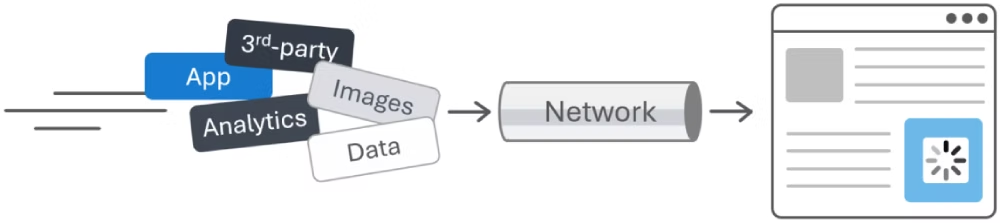
Illustration showing multiple pieces of a webapp, 3rd-party content, images, analytics, data, etc. all going through a single Network pipe, and, on the other side, a webpage with a part of it still loading.

To address this problem, we’re excited to introduce a new feature which web developers can start testing in Microsoft Edge today: Network Efficiency Guardrails.

If you’re a web developer, improving the load performance of your app starts with knowing what to focus on first. However, when your web app embeds a mix of first-party and third-party content from different sources, optimizing performance depends on each of these pieces—not just on what you built. That’s why identifying the resources that need to be optimized to improve your app’s load time is crucial, and that’s exactly what the Network Efficiency Guardrails feature does.

So, if you’re working on an app that embeds content, read on to learn more about Network Efficiency Guardrails and start using them.

Detecting bad resource-loading patterns

Based on our own experience working with large web-based applications, we know that there are certain resource-loading patterns which have a disproportionate impact on performance. For example:

  • Very large images
  • Uncompressed resources
  • Large data: URLs

With the Network Efficiency Guardrails feature, you can ask the browser to monitor your app’s network resource usage. Once network monitoring starts, the browser automatically identifies inefficient resource-loading patterns and reports them to you. You can then use this information to optimize your app for all your users.
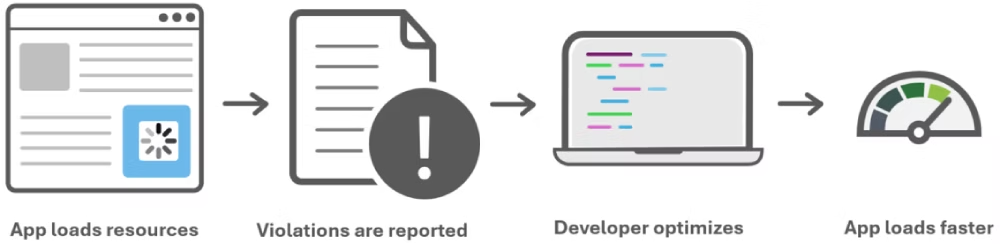
App loads resources, then violations are reported, then the developer optimizes their site, then the app loads faster.

In practice, you first opt into the feature by setting a Document Policy. Once you’ve done that, the offending loading patterns which the browser detects are reported as policy violations through the Reporting API, a web platform mechanism that lets you send structured reports back to your server when something notable happens at runtime.

What gets reported

Currently, when you opt into the Network Efficiency Guardrails feature, Microsoft Edge will use the following criteria to identify policy violations:

  • Text-based resources that are not HTTP-compressed.
  • Images larger than 200 kB.
  • data: URLs larger than 100 kB.

These are our initial criteria, and we believe they are effective at flagging resource usage patterns that are atypical for well‑performing apps.

We chose these criteria based on aggregate, real‑world data, established industry best practices, and Web Almanac findings. To learn more about how these values were chosen, you can read about it in our feature explainer document. We expect to make changes to these values as we continue to gather more feedback and data.

Try Network Efficiency Guardrails today

The feature is available in Microsoft Edge, starting with version 146. To try it, you’ll first need to enable it:

  1. In Edge, go to edge://flags.
  2. Type “Experimental Web Platform features” in the Search flags text box at the top.
  3. Under the Experimental Web Platform features section, select Enabled in the dropdown menu.
  4. Restart Edge.

Enable the document policy on your site

Next, opt into the feature by enabling the document policy on your site, which you can do in either of these two ways:

  • Set the document policy by sending the following HTTP response headers from your server:

    Document-Policy:network-efficiency-guardrails; report-to=neg-endpoint
    Reporting-Endpoints: neg-endpoint="/neg-reporting/"

    The report-to endpoint name and value are not important yet. They’re only required so you can start seeing reports, but you don’t need to have the server endpoint running yet.

  • Or set the above response headers by creating a local override in DevTools instead. To learn how to do this, see Override HTTP response headers.

    This can be helpful to quickly get started since you don’t have to modify your server code.

View the reported violations

Now that you have everything set up, you can use your app as normal, and the browser will start reporting problematic network usage patterns to you. You can view the reported violations either in DevTools, or on your server.

Using DevTools for this is a simple way to get started. As violations get detected, they’ll appear in the Console tool as error messages:
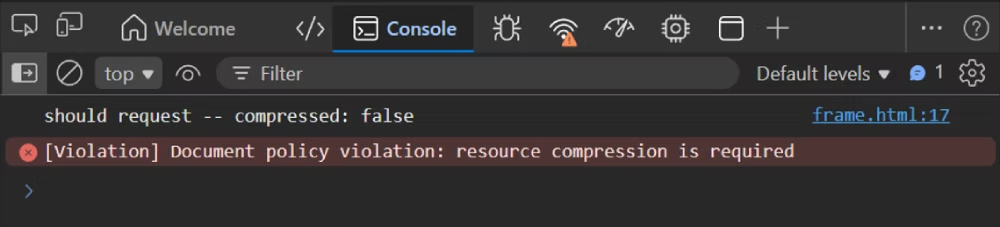
The Console tool in Microsoft Edge DevTools, showing a reported violation message saying: Document policy violation: resource compression is required.

And you can also see them in the Application tool, under the Reporting API section, where you can find more details about each report:
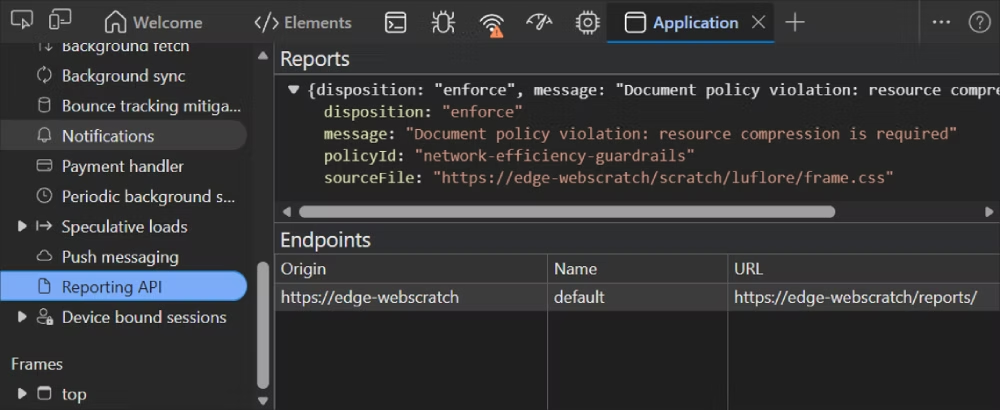
The Application tool in Microsoft Edge DevTools, showing the Reporting API data, which contains one report about a resource that lacks compression. The additional data provides the link to the source file which lacks compression.

Viewing the reports in DevTools is a great way to get started. However, if you want to use Network Efficiency Guardrails in production, and receive real reports from your users’ devices, you’ll also need to configure a reporting endpoint on your server.

Configure a reporting server endpoint

To collect reports in production, use the report-to field in the Document-Policy header, giving it the name of your choosing. And then specify the value for this server endpoint in Reporting-Endpoints:

Document-Policy: network-efficiency-guardrails; report-to=neg-endpoint
Reporting-Endpoints: neg-endpoint="/neg-reporting/"

Now, configure the /neg-reporting/ endpoint on your server and make sure it can receive the reports, as well as accept preflight requests if you’re using a cross-origin endpoint.

To learn more, read the Reporting API documentation at MDN, and our feature explainer.

View reports client-side

You can also retrieve violation reports on the client with JavaScript code. The reports are exposed to the document where they got created, through the Reporting client-side API.

Use the ReportingObserver interface to access these reports as they are raised, and look for reports that have ReportBody.featureId === "network-efficiency-guardrails".

Let us know what you think

The Network Efficiency Guardrails feature is in its early stages of development, and we’d love you to try it and share your feedback with us.

Learning about your app’s specific network usage patterns can help us design the right API for you.

We’re actively exploring the following open questions, so now is a great opportunity to try the feature and help us improve it:

  • Fine-tuning existing guardrails: help us better detect the network usage patterns based on your data and feedback.
  • Adding new guardrails: are there additional patterns that we should be considering?
  • Cross-frame reporting: how should a parent frame monitor a child frame? Should bidirectional monitoring be possible? How should guardrails be enforced on embedded frames?

Checkout out the Network Efficiency Guardrails explainer and let us know your feedback by opening a new issue.
Source link

Visited 1 times, 1 visit(s) today

Related Article

Musi loses App Store case as judge rules Apple can delist apps at any time

When Apple removed the free music streaming app Musi from the App Store in 2024, the developers sued. This week, a federal judge dismissed the lawsuit with prejudice in what might become a landmark case related to App Store delistings. Here are the details. Apple came away with about as complete a legal victory as

This wild iPhone 17 Pro case features a touchscreen for 48MP selfies

The new Center Stage selfie camera is one of the best features of Apple’s iPhone 17 series — but why settle for 18MP snaps when 48MP selfies are possible? That’s the question posed by Kickstarter case brand Dockcase, whose latest offering, the Selfix case, adds a touchscreen to the back of your iPhone 17 Pro

BuzzFeed debuts AI slop apps in bid for new revenue

BuzzFeed, the U.S.-based media company known best for its quizzes, listicles, and, for a time, a Pulitzer Prize-winning journalism division, is reinventing itself for the AI era. At least, that’s the pitch. At the SXSW conference in Austin, BuzzFeed co-founder and CEO Jonah Peretti introduced the company’s next media foray: a spin-off called Branch Office,

California DOJ Releases 2025 APPS Annual Report

“It takes a team of DOJ special agents and support staff to make APPS effective in removing firearms from those prohibited by law from possessing them.  This program operates with public safety in mind and Californians are safer because of it.” CSLEA President Alan Barcelona SACRAMENTO– On March 13, 2026, the California Attorney General announced

A PlayStation Portal update is adding a 1080p High Quality mode

Sony is rolling out a firmware update for its PlayStation Portal handheld that introduces a new quality option for both Remote Play and Cloud Streaming. Choosing the 1080p High Quality mode means that you’ll be able to stream games at a higher bitrate compared with the 1080p Standard option. You can switch to this mode

I Love How Skinny Oppo’s Foldable Phone Is, but I Hate That I Can’t Buy It

There’s a lot I like about Oppo’s Find N6 foldable phone, now that I’ve had some time to test it. It’s powerful, with glorious 8.12-inch inner and 6.62-inch outer displays and a new hinge design results in a barely noticeable crease on the inner display. It even has a triple IP rating for water resistance,

WhatsApp 測試「訪客聊天」功能,沒帳號也能透過連結加入對話

WhatsApp 測試「訪客聊天」功能,沒帳號也能透過連結加入對話 WhatsApp 正測試一項相當特別的新功能:即使對方沒有 WhatsApp 帳號,也能透過連結先聊起來。這項名為「訪客聊天」(Guest Chats)的新設計,目前已開始向部分 Android、iOS 以及網頁 beta 用家推出,讓你可透過分享邀請連結,把沒有註冊 WhatsApp 的人拉進一段臨時對話。 這項功能的核心概念很直接,就是先讓人聊,再慢慢決定是否註冊帳號。對 Meta 而言,「訪客聊天」不只是一個便利功能那麼簡單,感覺上更像是吸引新用家接觸 WhatsApp 的新入口。​ 怎樣使用? 根據 WABetaInfo 的說法,用家可在 WhatsApp 的「邀請好友」區域,或聯絡人清單底部生成一條邀請連結,之後透過 SMS 或其他 App 分享出去。收到連結的人可在手機或桌面瀏覽器開啟,然後選擇下載 WhatsApp,或者直接以訪客身份繼續。 若對方選擇以訪客身份加入,系統會在瀏覽器中開啟類似 WhatsApp Web 的對話介面。訪客需要先接受服務條款、輸入名稱,之後才能正式開始聊天,而且真正啟動對話的一方會是收到連結的訪客,而不是發出邀請的 WhatsApp 用家。 仍有端對端加密 即使訪客沒有 WhatsApp 帳號,這類對話仍然採用端對端加密保護。WABetaInfo 指出,當訪客以瀏覽器加入對話時,WhatsApp 網頁端會建立一個獨特識別碼,用來生成加密金鑰,因此 WhatsApp 本身也無法看到訊息內容。 在對話介面中,WhatsApp 也會清楚標示對方是「訪客」,並附上未註冊 WhatsApp 的提示,讓帳號持有人知道目前面對的是一個訪客身份。這種做法有助降低混淆,但並不等於身分已被平台驗證。 最大風險是身分無法確認 「訪客聊天」最大的限制,不是功能少,而是身分可信度較低。由於訪客沒有正式 WhatsApp 帳號,也未經平台驗證,因此只要有人拿到邀請連結,就有可能進入對話。 這代表若連結透過電郵等方式外流,或者原本的收件人已更換號碼、帳戶被入侵,理論上都可能讓其他人加入聊天。也因為如此,這項功能雖然方便,但比較適合用來處理臨時、低敏感度的文字對話,而不適合承載太私密的資訊。 WhatsApp 測試「訪客聊天」功能 功能非常克制

iOS 26’s new Phone app has a feature I don’t ever want to go without

Apple overhauled the Phone app in iOS 26 with a new design and added several powerful features, including a new call screening option that I don’t ever want to go without. iOS 26 gives Phone app an overhaul with several new features Among the hundreds of new features and changes introduced in iOS 26, Apple

EV Market Monitor – February 2026

February underscored the EV market’s new reality, with new EV sales sharply lower year over year and used EV momentum continuing to build. Inventory levels tightened from January and prices were pushed lower across both new and used segments, highlighting a market increasingly driven by affordability and demand alignment. New and Used EV Sales –

Premier Coach Achieves Tesla-Certified Collision Center Status to Serve Growing EV Market

THOUSAND OAKS, CA – March 16, 2026 – PRESSADVANTAGE – Premier Coach has earned designation as a Tesla-Certified Collision Center, positioning the auto collision repair facility to meet the specialized repair needs of Tesla vehicle owners with factory-approved techniques and equipment. The certification represents a significant investment in training, equipment, and facility upgrades required to

Samsung admits ‘some variation’ in Galaxy S26 Ultra’s screen brightness due to Privacy Display — but it should be ‘negligible’

Samsung acknowledges Galaxy S26 Ultra display brightness variation It’s a product of the new Privacy Display feature It’s unlikely to impact the user experience Is the Samsung Galaxy S26 Ultra display slightly dimmer because of the new Privacy display technology? The short answer is yes. However, I just received the more considered answer from Samsung,

US government withdraws draft rule chip rules and why it is big relief for AMD and Nvidia

The United States Department of Commerce has withdrawn a proposed rule on artificial intelligence (AI) chips. The proposed rule would’ve restricted American chip companies like Nvidia, AMD and Intel from exporting chips without US approval. According to an update posted on the Office of Management and Budget website (seen by Bloomberg), the interagency review of

European companies tell European Union what American tech companies have been trying to: We are not truly in the position to … |

AI generated image for representation European companies have reportedly warned the European Union against rapidly reducing reliance on American technology providers. A report cited European companies to claim that “tech sovereignty” in the region could be difficult to achieve quickly without affecting business operations. According to a Financial Times report, EU-based companies across sectors, including

‘The Sandbox’ Documentary Film Interview on Technology, Power: CPH:DOX

In The Sandbox, we are all digitizable and disposable. The documentary from Kenya-Jade Pinto takes us inside cutting-edge technology, including artificial intelligence, and its role in surveillance, power politics and border control amid discussions about migration. The Sandbox world premieres in the main competition of the 23rd edition of the Copenhagen International Documentary Film Festival, CPH:DOX on Tuesday,

Chinese Payment Apps Raise Concerns of a Parallel Economy in Japan

Finance Minister Satsuki Katayama said on March 11 that the spread of Chinese smartphone payment apps in Japan, and the emergence of communities operating outside Japan’s legal and regulatory framework, posed “a serious issue.” She said Japan would work with the G7 nations, including the United States and European partners, to address it. Katayama made

Android 17 Blocks Non-Accessibility Apps from Accessibility API to Prevent Malware Abuse

Ravie LakshmananMar 16, 2026Mobile Security / Data Protection Google is testing a new security feature as part of Android Advanced Protection Mode (AAPM) that prevents certain kinds of apps from using the accessibility services API. The change, incorporated in Android 17 Beta 2, was first reported by Android Authority last week. AAPM was introduced by

Psycholology says people who plan their days in writing and people who use phone apps aren’t just using different tools — they’re processing their entire sense of direction differently

Add VegOut to your Google News feed. You know that feeling when you watch someone pull out a leather-bound planner in a coffee shop while you’re frantically swiping through your calendar app? There’s something almost ritualistic about the way they write, crossing things off with actual ink. Meanwhile, you’re juggling three productivity apps, color-coded notifications,

Ukraine’s anti-drone tech is in high demand as Iran attacks its neighbors

KYIV, Ukraine — As the conflict in the Middle East escalates, Ukraine could prove to be an invaluable trove of battle-tested expertise from its own bitter and costly fight against Russia. After months of pressure and hardened rhetoric from Washington aimed at ending the war in Ukraine, Kyiv is now also fielding requests for help

0
Would love your thoughts, please comment.x
()
x