How To Use the iPhone Notes App To Send Secret Chats

You may not realize it, but your phone is the perfect conduit for sending secret messages. You don’t need a shady app to facilitate things, either. Head straight to the Notes on your iPhone, and get ready to learn how to pull off top secret chats straight from the built-in app you likely use every day. 

CNET Tips_Tech CNET Tips_Tech

No matter the nature of your private conversation, you have plenty of options available to you. Apps like Signal and Whatsapp are popular for their focus on privacy. Why complicate things when you don’t have to?

The built-in Notes app for iOS is a secret weapon for private conversations. It’s always fun when you find a way to use an app outside of its intended use. It’s almost like you’re using it in a sneaky way that you shouldn’t be, but all of the parts are there to make this a simple way to have private conversations with someone. We’ll lay it all out for you below. 

For more iOS tips, check out the new features in iOS 17.5 and how to easily view and copy Wi-Fi passwords on your iPhone or iPad.

Create a note in the Notes app

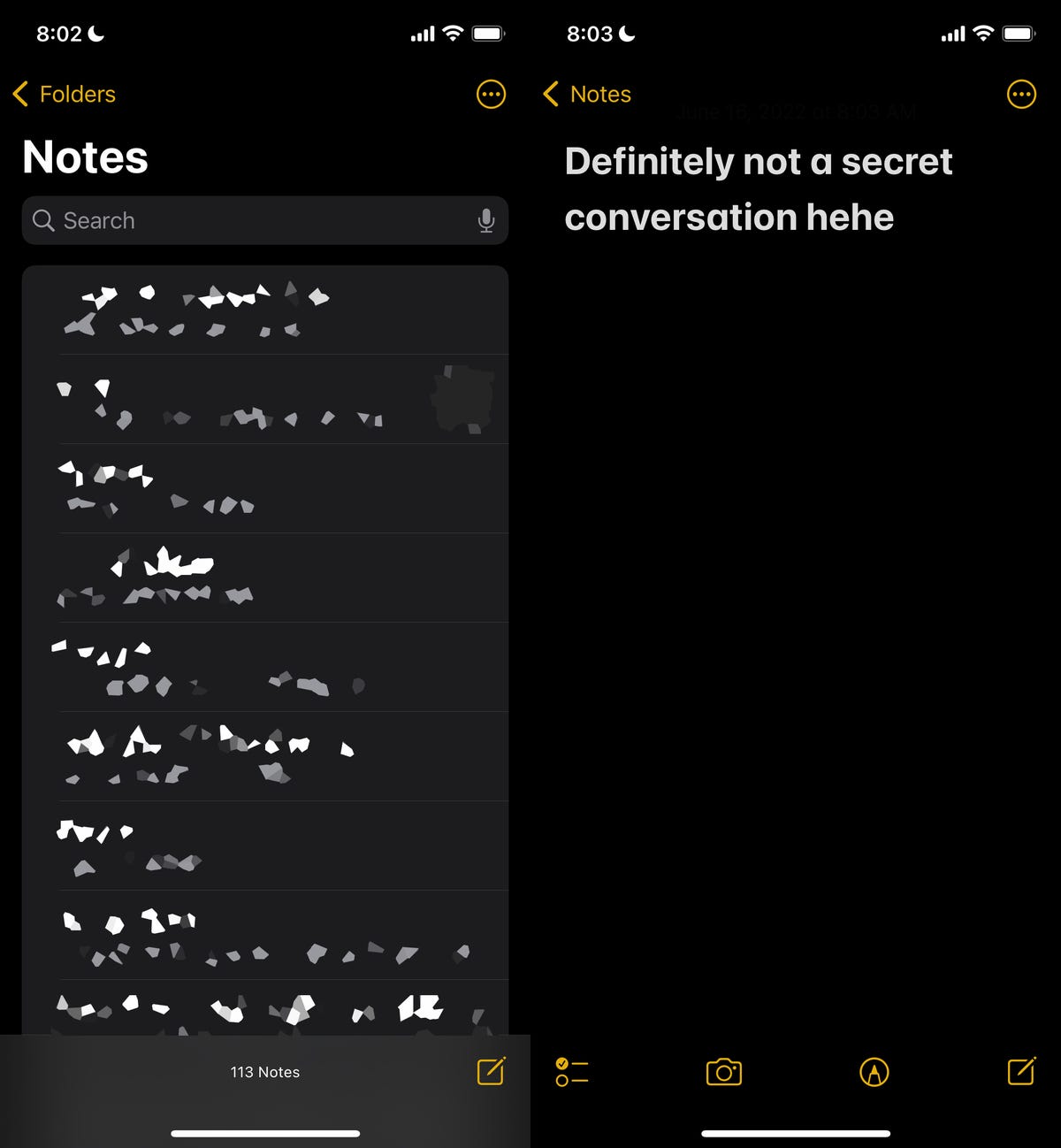
On your iPhone, launch the Notes app, and tap the Compose button on the bottom right to create a new note. Next, type anything into the note to keep it, or else it’ll automatically be deleted when you exit from the note. You can also just go into an existing note, but it’s better to start fresh with a new one.
Notes app on iPhone Notes app on iPhone

First, create a new note or go into an existing one.

Nelson Aguilar/CNET

Adjust your note’s share options to add collaborators

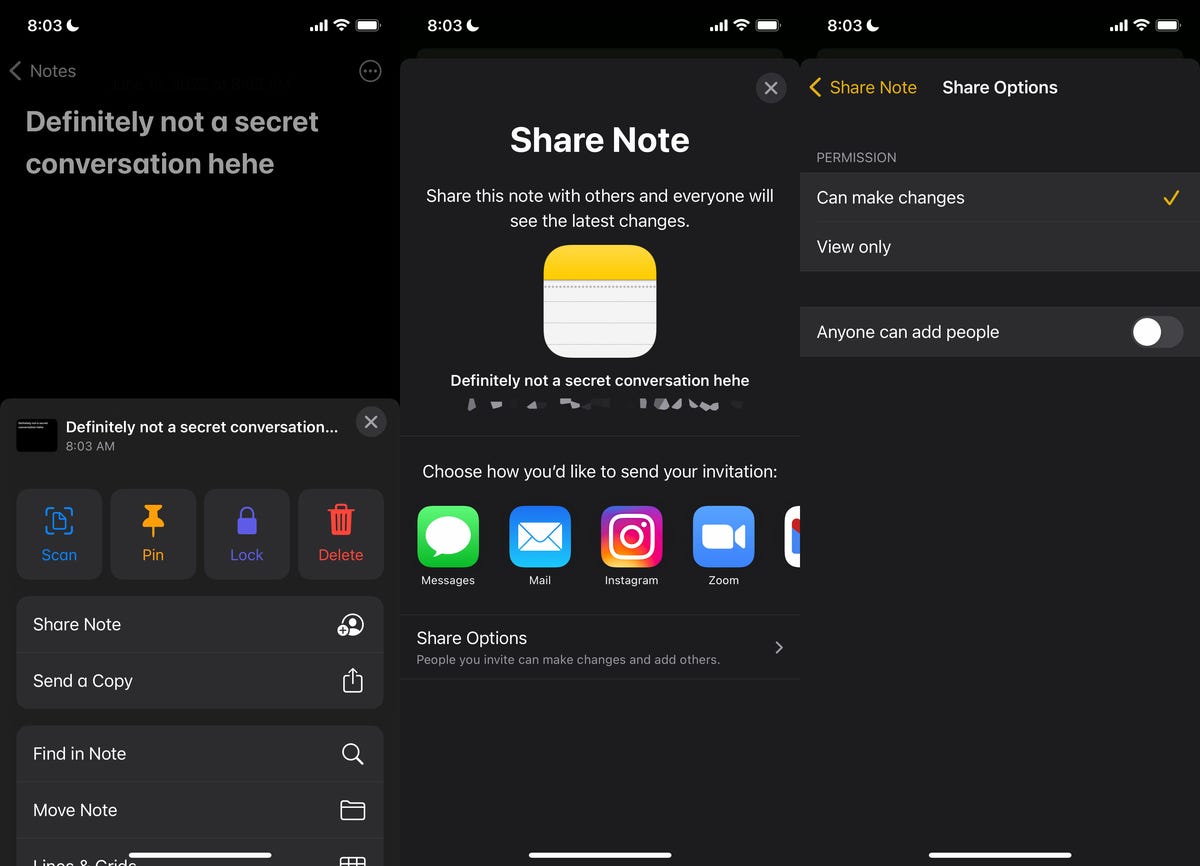
Once your note is up and ready to go, you can begin the process of adding another person as a collaborator, which means they can read and edit whatever is in the note. To start, tap the More button on the top right, and then hit Share Note.

Now tap Share Options and make sure the Can make changes option is selected under Permission. You should also toggle off Anyone can add people in case you want to be the only person who can add collaborators to your note. Go back to the last page when you’re finished configuring these settings.
Notes app on iPhone Notes app on iPhone

Second, manage what your collaborators can do.

Nelson Aguilar/CNET

Add people and share the link

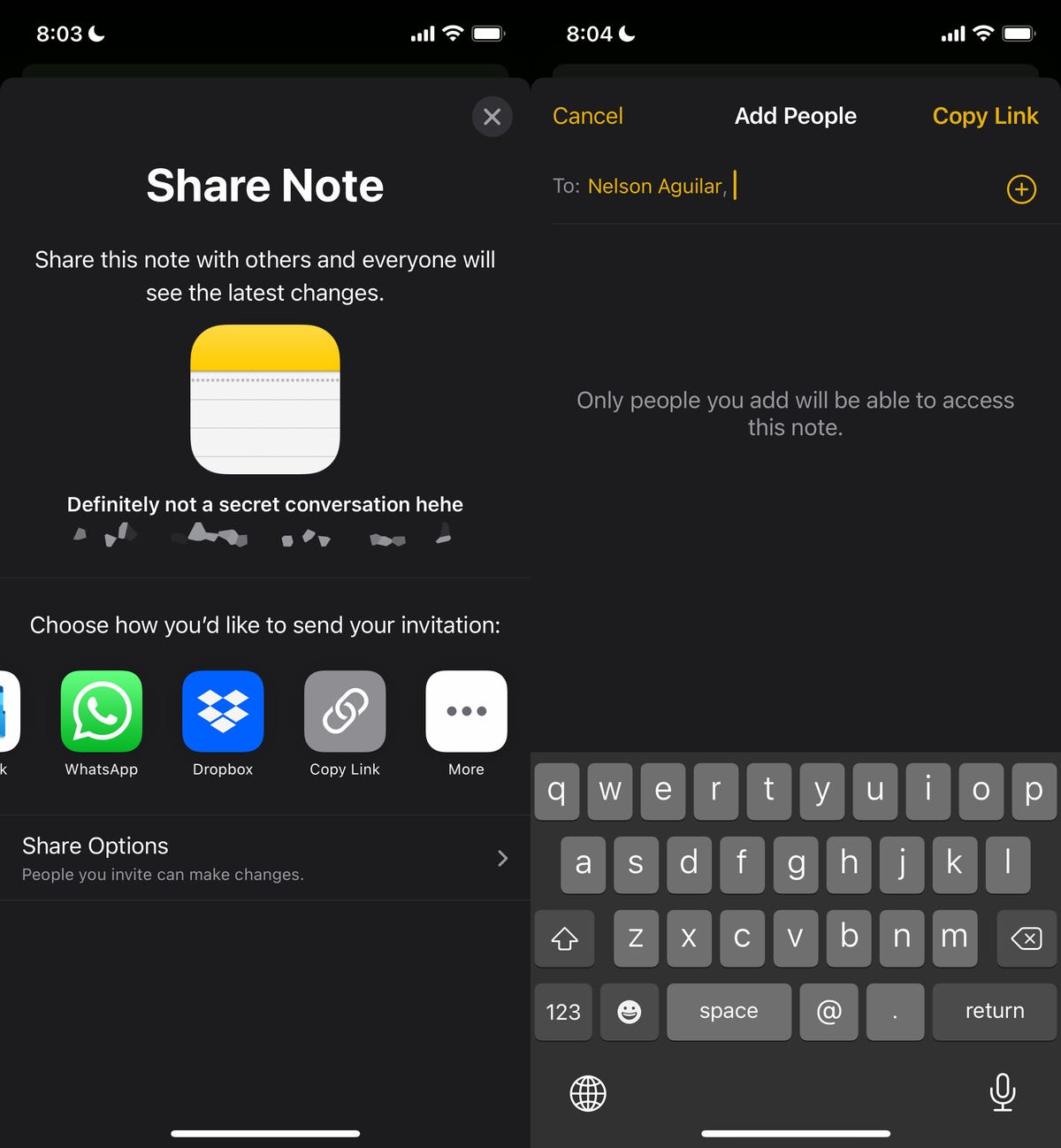
Next, choose a method to share the note: You can send it via text message, email, social media and more. If you swipe on the share options, you can also select Copy Link, which copies the note link to your clipboard and allows you to paste it wherever you want. 

For this example, I’ll choose the Copy Link option to share the note.

At the top of the Copy Link page, enter the email address or phone number of the person you want to access the note. You can also tap the Add icon to search through your contacts. Adding a contact to the note is required. If you share the link without adding a contact, the other person won’t be able to see or edit the note, even with the link.

Lastly, hit Copy Link to copy the note link to your clipboard and share it with your collaborator.
Notes app on iPhone Notes app on iPhone

Next, add your collaborator(s).

Nelson Aguilar/CNET

Send secret messages using Notes

The other person, on the receiving end, must now open the note link and accept the invitation. If they accept, they’ll be redirected to the Notes app and to the collaborative note you just created.

To communicate, simply type something into the note, which the other person will be able to see in real-time without you having to hit send. They’ll also receive a notification anytime the note is altered. 

Each person in the note will have a corresponding color appear (only for a moment) so that everyone else knows who typed what. You can also swipe right from the middle of the note to see the name of who wrote the message, as well as a timestamp for when the message was written and any corresponding colors. 

Notes app on iPhone Notes app on iPhone

Now you can secretly communicate with your friends or family.

Nelson Aguilar/CNET

You can also tap the Share Note button (with the checkmark icon), go to Manage Shared Note and then toggle on Highlight All Changes. That way, all messages will stay permanently highlighted in their corresponding color, making it easier to read the conversation.

If you want to keep your communications more low-key, delete your message or the other person’s message to strike it from the note. That way your conversation is more like it would be on Snapchat, with ephemeral or short-lived messages that outsiders can’t see if they snoop through your notes. You can do this with any text in the notes, as well as photos, videos, links, drawings or any other attachments you add to the note.

Delete your secret chat for good

Not all secret conversations can go on forever, and so it’s time now to end it. 

If you’re the owner of the note and want to keep the note intact for everyone but prevent them from editing it, you can easily do so. On the top right, tap the View Participants button and then hit Manage Shared Note. To remove a participant, you can either swipe left on their name and then hit Remove or you can tap on their name and then tap Remove Access.
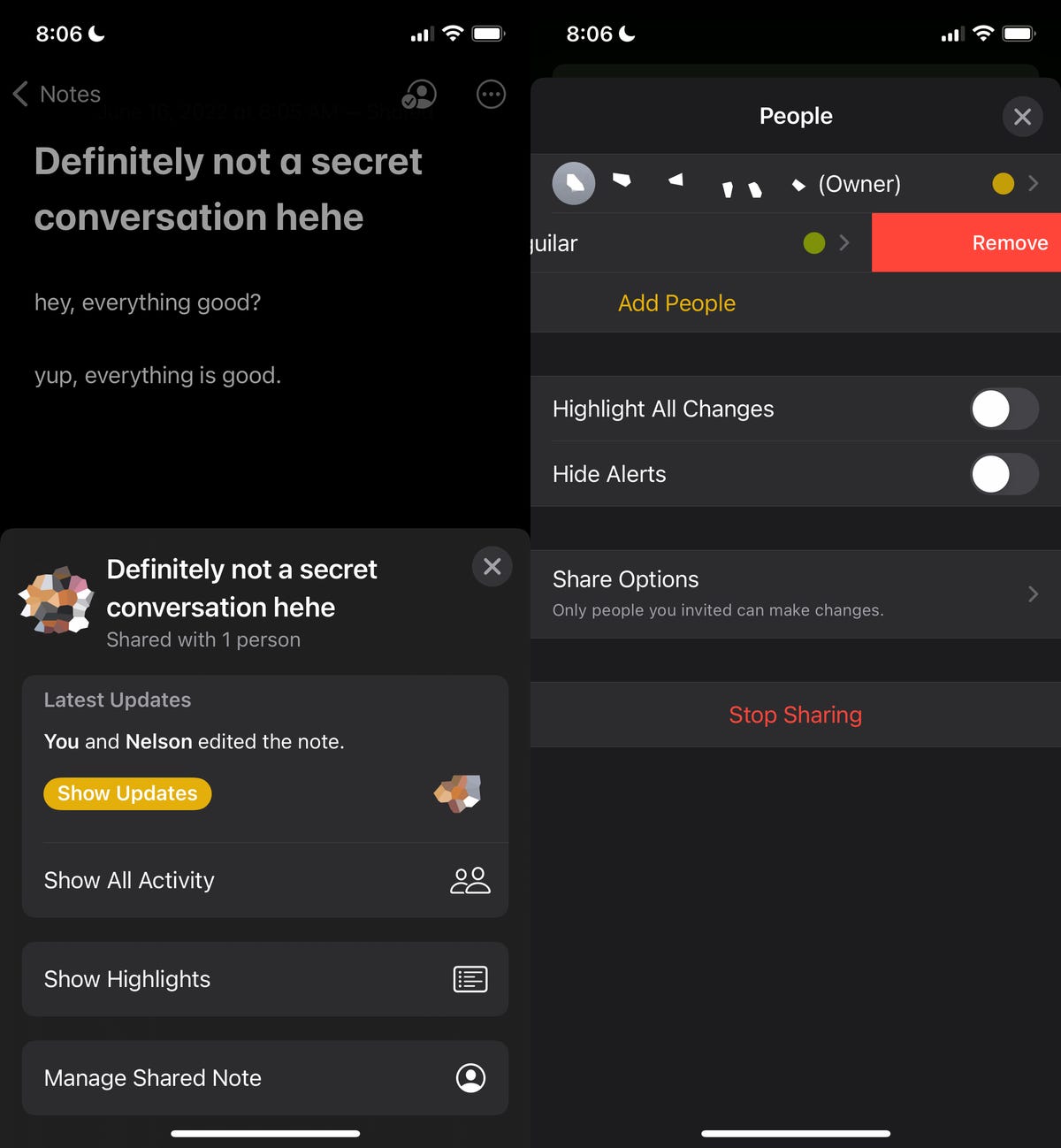
Notes app on iPhone Notes app on iPhone

To end the notes conversation, remove any collaborators or stop sharing the note.

Nelson Aguilar/CNET

Additionally, you can tap the Stop Sharing option, which will not only remove participants from the note but also delete the note from all of their devices.

If you’re not the owner of the note, you can just delete the note from the Notes application.

For more tech tips, don’t miss how to save money by borrowing an Airtag for travel and the two settings to change on your iPhone to go to sleep faster.




Source link

Visited 1 times, 1 visit(s) today

Related Article

X, A Bastion For Hate, Claims It Will Reduce Hate Content In The UK

Christopher Furlong/Getty Images X has committed to reducing “hate and terror content” in the UK, according to the regulator Ofcom, by speeding up its review process for offending content and “withhold access in the UK” to accounts which post “illegal terrorist content” and are determined to be “operated by

Fitbit Air vs Whoop Strap Comparison: Price, Features and AI

The Google Fitbit Air is very much the talk of the fitness tracking town right now, not only because it’s the first new Fitbit device that we’ve had in years, but it’s also one of the first big brands to go head-to-head with the established Whoop Strap (if you don’t count the Polar Loop and

India EV Sales Jump 62% As Global EV Market Tops 20 Million In 2025: ICCT

Latest research by the International Council on Clean Transportation (ICCT) showed a sharp rise in global sales of light-duty electric vehicles (EVs), which crossed 20 million units in 2025. The study noted that EVs accounted for nearly 25% of new light-duty vehicle (LDV) sales globally, up from around 19% in 2024 and 15% in 2023.

xAI Introduces Its Coding Agent Called Grok Build

xAI xAI has launched a coding agent of its own to serve as competitor to its rivals’ products, such as Anthropic’s Claude Code. It’s called Grok Build, and it’s still in its early beta version that’s initially only available to SuperGrok Heavy subscribers paying $300 per month for

OpenAI brings Codex to phones via ChatGPT app

ChatGPT-maker OpenAI introduced Codex desktop application in February this year. The company has now announced that its AI coding assistant, Codex is now available on mobile via the ChatGPT app. This will enable the developers to manage and approve coding tasks directly from their phones. The rollout, currently in preview for iOS and Android, expands

Spectrum Adds discovery+ Streaming App to Eligible TV Plans at No Additional Cost

Spectrum and Warner Bros. Discovery announced that the discovery+ streaming app is now included at no additional cost for customers with eligible Spectrum TV plans.  Now Spectrum TV customers can immediately begin streaming their favorite discovery+ hit shows, from 90 Day Fiancé to Gold Rush and Ghost Adventures. This builds on Spectrum’s Seamless

Comparing AT&T and Verizon Mobile Phone Plans

In the space of a few months, Verizon got a new CEO who lowered prices and AT&T revamped its entire postpaid phone plan lineup, then separately added a new top-tier plan. If you’re considering jumping to AT&T or Verizon for your phone service, or thinking about changing your existing plan, we’re here to compare their offerings. (Are you reading

Google confirms native, premium apps will be ready for Googlebook launch

Support our independent tech coverage. Chrome Unboxed is written by real people, for real people—not search algorithms. Join Chrome Unboxed Plus for just $2 a month to get an ad-free experience, access to our private Discord, and more. Learn more about membership here.START FREE TRIAL (MONTHLY)START FREE TRIAL (ANNUAL) When it comes to the success

Alienware’s First Affordable Gaming Laptop Is Arriving At The Perfect Time

Even though Alienware has been around for 30 years, the company hasn’t really made an affordable, entry-level gaming laptop. But that changes today with the succinctly named Alienware 15, and based on the rising price of seemingly every gadget, it couldn’t have come at a better time. Let’s start with the basics. The Alienware 15

Samsung Galaxy S24 Battery Explosion Reported

Summary created by Smart Answers AI In summary: Tech Advisor reports a Samsung Galaxy S24 allegedly exploded in a user’s hand in South Korea, causing minor burns and prompting a forensic investigation by Samsung. This incident recalls the 2016 Galaxy Note 7 recall crisis and raises concerns about ongoing battery safety issues despite Samsung’s eight-point

Modular EV Architecture Platforms Market Roadmap: Expected

Modular EV Architecture Platforms Market The Global Modular EV Architecture Platforms Market Study, a comprehensive analysis of the market that spans more than 143+ pages and describes the product and industry scope as well as the market prognosis and status for 2025-2032. The marketization process is being accelerated by the market study’s segmentation by important

12 Best Apps to Draw Tattoo Designs in 2026

In today’s digital age, tattoo apps have become indispensable tools for both aspiring and professional tattoo artists. They give tattoo artists the ability to create designs digitally, saving them time and allowing them to present professional designs to their clients. So, what app do tattoo artists use? which one is the best? Having the right

Cadillac hits 100,000 EV sales as Tesla drivers jump ship

Cadillac has hit a major milestone in the luxury EV race, reaching 100,000 electric vehicle sales just a few years after launching its first all-electric model. As Motor1 noted, GM said in January 2019 that Cadillac would spearhead its EV effort. That strategy began to take shape with the 2023 Lyriq, which was Cadillac’s first

Dangerous Deepfakes and AI Therapy: What Parents Need to Know

On this episode of Generation AI, host Derek Staahl digs into two AI trends that are hitting close to home for families right now. First: “nudify” apps and dangerous deepfakes. These tools can take an ordinary photo and turn it into an explicit AI-generated image—and a new investigation shows students around the world are being

0
Would love your thoughts, please comment.x
()
x